VLC EXE/MSI - how to "switch" installers
-
Note: VLC now ships the MSI again, we have re-enabled support for updating MSI based installations. The below is kept for those who wants to change installers, as well as an example of how to do similar things for other applications.
Hi,
If you're experiencing issues with VLC not updating, this may be because the vendor stopped creating MSI installers as of version (3.21). We rely on official vendor installers and will update our package as soon as the MSI becomes available.
You can follow the official discussion thread here for more details:
https://forum.videolan.org/viewtopic.php?f=14&t=164735&p=544928&hilit=msi#p544928To help differentiate between installer types, we've updated VLC's title to clearly indicate whether it's an MSI or EXE installer:
VLC media player (EXE)
VLC media player (MSI)
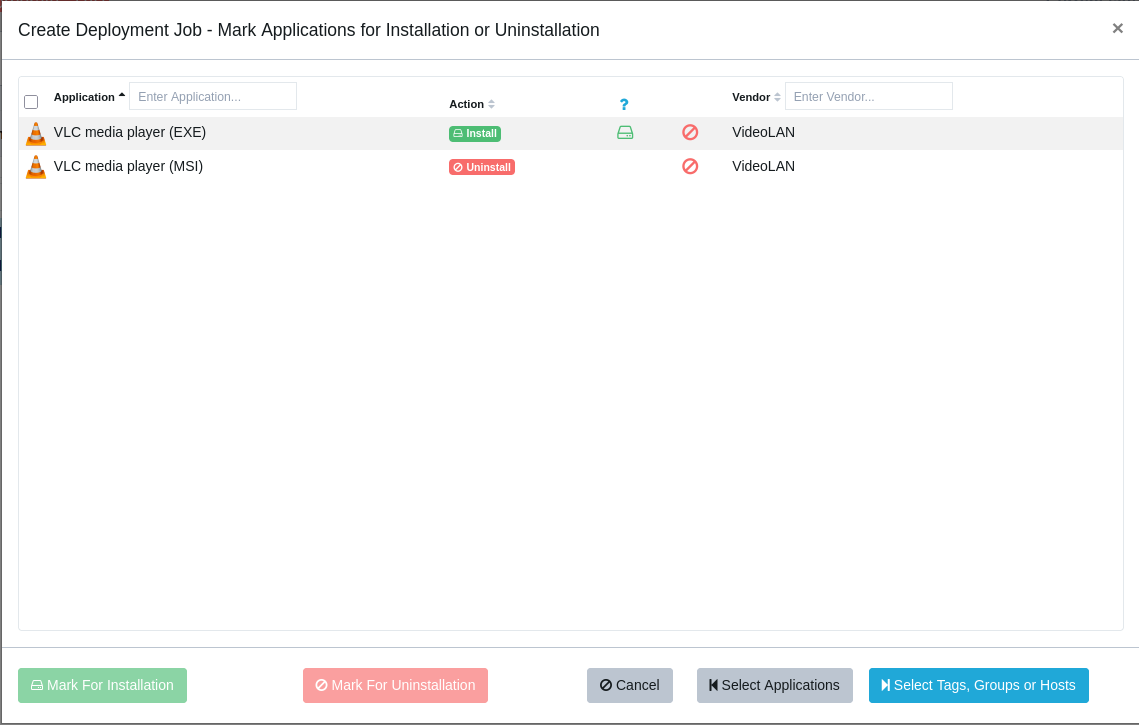
To switch your MSI installation to the EXE version, use the Software Deployment feature to create a combined job that removes the MSI and deploys the EXE version simultaneously:
-
T Tom moved this topic from [Custom Software guide drafts] on

Hello! It looks like you're interested in this conversation, but you don't have an account yet.
Getting fed up of having to scroll through the same posts each visit? When you register for an account, you'll always come back to exactly where you were before, and choose to be notified of new replies (either via email, or push notification). You'll also be able to save bookmarks and upvote posts to show your appreciation to other community members.
With your input, this post could be even better 💗
Register Login