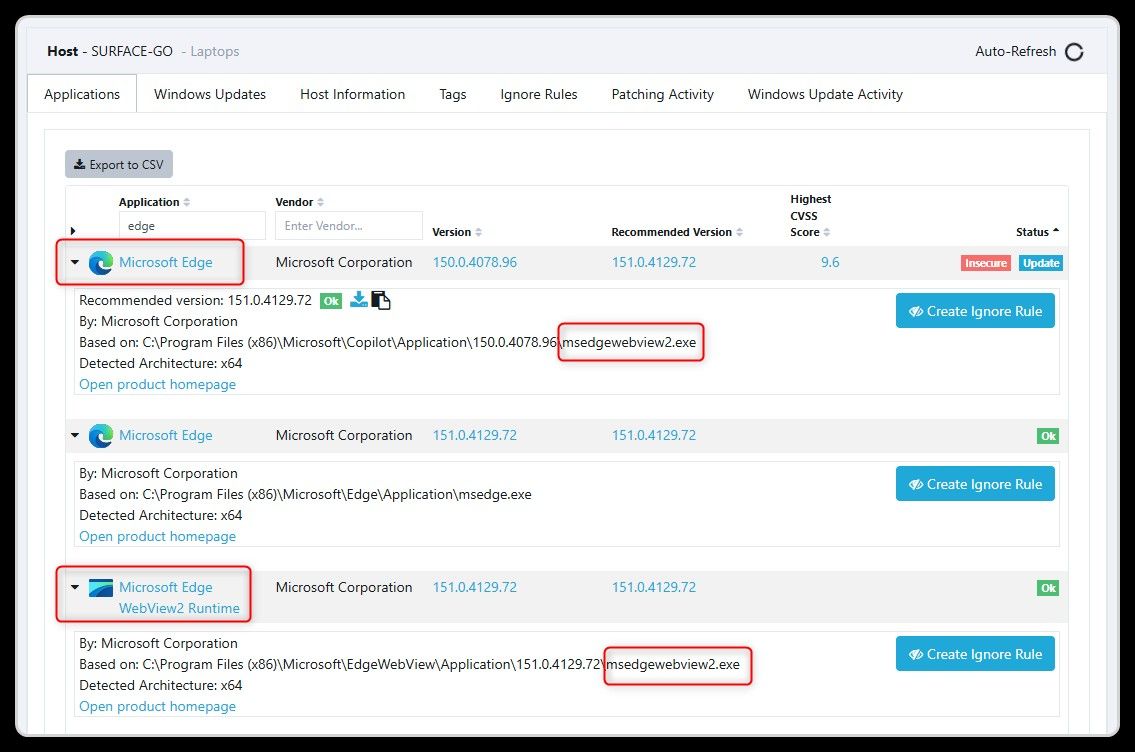
Microsoft Edge WebView2 Runtime is detected as Detected as Microsoft Edge:
 O
Offline
O
Offline
Microsoft Edge WebView2 Runtime is detected as Detected as Microsoft Edge:
For FreeCommander XE (donor) VulnDetect detects the version 2026.0.0.940.
In the Help -> About window of FreeCommander XE (donor) the version number 2026 Build 952 is displayed.
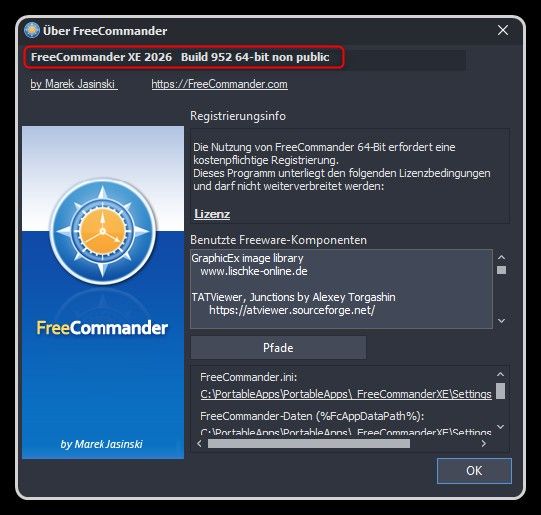
XE 2026 release 952 donor
Here the information extracted from the EXE file:
File name and path:     C:\PortableApps\PortableApps\_FreeCommanderXE\FreeCommander.exe
Product Name:           FreeCommander XE
Internal Name:
Original Filename:

File Description:       FreeCommander (x64) - file manager for Windows
Company:                Marek Jasinski
Legal Copyright:        www.freecommander.com
Legal Trademarks:
Comments:

File Version String:    2026.0.0.952
File Version:           2026.0.0.952
Product Version String: 2026.0.0.940
Product Version:        2026.0.0.940
For Microsoft Defender VulnDetect detects the version 10.8830.27933.1000.
But VulnDetect recommends the version 10.8821.27906.1000 (VulnDetect recommends an OLDER version).
Please recommend the currently available version!
Here the information extracted from the EXE file:
File name and path:     C:\Program Files\Windows Defender Advanced Threat Protection\MsSense.exe
Product Name:           Microsoft® Windows® Operating System
Internal Name:          MsSense.exe
Original Filename:      MsSense.exe.mui

File Description:       Windows Defender Advanced Threat Protection Service Executable
Company:                Microsoft Corporation
Legal Copyright:        © Microsoft Corporation. All rights reserved.
Legal Trademarks:
Comments:

File Version String:    10.8830.27933.1000 (398a21db4cbd4447fb5832b9f888cad9bc8ab8d1) (WinBuild.160101.0800)
File Version:           10.8830.27933.1000
Product Version String: 10.8830.27933.1000
Product Version:        10.8830.27933.1000
For Microsoft Edge now the version 150.0.4078.83 is detected and also version 150.0.4078.83 is recommended.
@Tom: Thank you for fixing this!
Ahnenblatt (Portable) is now detected by VulnDetect and the version number 4.48 is also correct.
@Tom: Thank you for fixing this!
For Ahnenblatt VulnDetect detects the version 4.48.
But VulnDetect recommends the version 4.46 (VulnDetect recommends an OLDER version).
Please recommend the currently available version!
Here the information extracted from the EXE file:
File name and path:     C:\PortableApps\PortableApps\_Ahnenblatt\Ahnenblatt4Portable.exe
Product Name:           Ahnenblatt 4
Internal Name:          Ahnenblatt
Original Filename:      Ahnenblatt4.exe

File Description:       Ahnenblatt 4
Company:                Dirk Böttcher
Legal Copyright:        (C) Dirk Böttcher 1992-2026
Legal Trademarks:
Comments:               www.ahnenblatt.de / www.ahnenblatt.com

File Version String:    4.48.0.0
File Version:           4.48.0.0
Product Version String: 4.48
Product Version:        4.48.0.0
Wallpaper Engine was detected in the past but currently it is no longer detected.
Here the information extracted from the EXE file:
File name and path:     E:\SteamLibrary\steamapps\common\wallpaper_engine\launcher.exe
Product Name:           Wallpaper Engine
Internal Name:          launcher
Original Filename:      launcher.exe

File Description:       Wallpaper Engine Launcher
Company:                Skutta Software GmbH
Legal Copyright:        Copyright (C) 2026 Skutta Software GmbH
Legal Trademarks:
Comments:

File Version String:    2.8.0.42
File Version:           2.8.0.42
Product Version String: 2.8.0.42
Product Version:        2.8.0.42
UniGetUI was detected in the past but currently it is no longer detected.
Here the information extracted from the EXE file:
File name and path:     C:\PortableApps\PortableApps\_UniGetUI\UniGetUI.exe
Product Name:           UniGetUI
Internal Name:          UniGetUI.dll
Original Filename:      UniGetUI.dll

File Description:       UniGetUI
Company:                Devolutions Inc.
Legal Copyright:        Copyright 2021-2026 Devolutions Inc.
Legal Trademarks:
Comments:               UniGetUI

File Version String:    2026.2.5.0
File Version:           2026.2.5.0
Product Version String: 2026.2.5
Product Version:        2026.2.5.0
For Synergy now the version 3.7.0 beta is detected.
@Tom: Thank you for fixing this!
Super Productivity is now detected by VulnDetect and also the detected version number is correct.
@Tom: Thank you for adding this app!
Plitch is now detected by VulnDetect and also the detected version number is correct.
@Tom: Thank you for adding this app!
Synergy is now detected by VulnDetect and also the detected version number is correct.
@Tom: Thank you for adding this app!
For Super Productivity VulnDetect detects the version 18.15.1.0.
But VulnDetect recommends the version 18.14.0 (VulnDetect recommends an OLDER version).
Please recommend the currently available version!
Here the information extracted from the EXE file:
File name and path:     C:\Users\olive\AppData\Local\Programs\superProductivity\Super Productivity\Super Productivity.exe
Product Name:           Super Productivity
Internal Name:          Super Productivity
Original Filename:

File Description:       Super Productivity
Company:                Johannes Millan
Legal Copyright:        Copyright © 2026 Johannes Millan
Legal Trademarks:
Comments:

File Version String:    18.15.1
File Version:           18.15.1.0
Product Version String: 18.15.1.0
Product Version:        18.15.1.0
SecTeer VulnDetect was detected in the past but currently it is no longer detected.
Here the information extracted from the EXE file:
File name and path:     C:\Program Files (x86)\SecTeer VulnDetect\secteer.exe
Product Name:           SecTeer VulnDetect
Internal Name:          SecTeer Agent
Original Filename:      secteer.exe

File Description:       SecTeer Agent
Company:                SecTeer ApS
Legal Copyright:        © 2018-2024 SecTeer ApS. All rights reserved.
Legal Trademarks:
Comments:

File Version String:    3.4.0.0
File Version:           3.4.0.0
Product Version String: 3.4.0.0
Product Version:        3.4.0.0
For Screenshot Captor now the version 4.36.2 is detected and also version 4.36.2 is recommended.
@Tom: Thank you for fixing this!
For Samsung Magician VulnDetect detects the version 9.0.1.
But VulnDetect recommends the version 9.0.0 (VulnDetect recommends an OLDER version).
Please recommend the currently available version!
Here the information extracted from the EXE file:
File name and path:     C:\Program Files (x86)\Samsung\Samsung Magician\SamsungMagician.exe
Product Name:           Samsung Magician
Internal Name:          SamsungMagician
Original Filename:      SamsungMagician.exe

File Description:       SamsungMagician
Company:                Samsung Electronics Co., Ltd.
Legal Copyright:        Copyright © 2026 Samsung Electronics Co., Ltd.
Legal Trademarks:
Comments:

File Version String:    9.0.1.950
File Version:           9.0.1.950
Product Version String: 9.0.1.950
Product Version:        9.0.1.950
For PhraseExpress VulnDetect recommends the version 18.0.74.
But I have version 18.0.76 installed (VulnDetect recommends an OLDER version).
Please recommend the currently available version!
Here the information extracted from the EXE file:
File name and path:     C:\PortableApps\PortableApps\_PhraseExpress\PhraseExpress.exe
Product Name:           PhraseExpress
Internal Name:
Original Filename:      PhraseExpress.exe

File Description:       PhraseExpress
Company:                Bartels Media GmbH
Legal Copyright:        Copyright © 2026 Bartels Media GmbH
Legal Trademarks:
Comments:

File Version String:    18.0.76.0
File Version:           18.0.76.0
Product Version String: 18.0
Product Version:        18.0.0.0
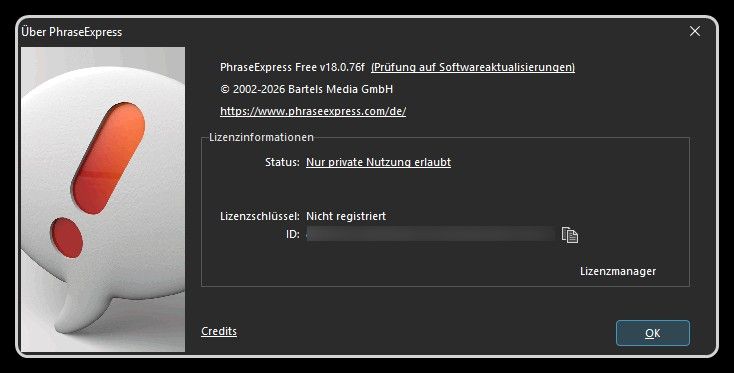
For PhraseExpress VulnDetect detects the version 18.0.
In the Help -> About window of PhraseExpress the version number 18.0.76f is displayed.
Here the information extracted from the EXE file:
File name and path:     C:\PortableApps\PortableApps\_PhraseExpress\PhraseExpress.exe
Product Name:           PhraseExpress
Internal Name:
Original Filename:      PhraseExpress.exe

File Description:       PhraseExpress
Company:                Bartels Media GmbH
Legal Copyright:        Copyright © 2026 Bartels Media GmbH
Legal Trademarks:
Comments:

File Version String:    18.0.76.0
File Version:           18.0.76.0
Product Version String: 18.0
Product Version:        18.0.0.0
For AdwCleaner now the version 8.8.1 is detected and also version 8.8.1 is recommended.
@Tom: Thank you for fixing this!
For NVIDIA app now the version 11.0.8.299 is detected and also version 11.0.8.299 is recommended.
@Tom: Thank you for fixing this!