[Implemented] Add icons to indicate collapse feature
-
I clicked in the list of applications next to a link (I wanted to click the link but missed it) and suddenly the entry expanded (so I was able to see the Company and the file path).
I did not expect this because the UI (user interface) does not give me any information that the entries can be expanded and collapsed.
The UI should give users the information when he can interact with it.So please change the mouse pointer to a hand pointer (so users see that the entry can be clicked).
And please add in front of every entry an icon that indicates that the entry can be expanded (for example the icon ">").
If an entry is expanded then change the icon to "v" (indicates that the expanded entry can be collapsed). -
You are lucky to find the way to expand entries. I only discover how to display the path, so the product, to update by clicking on the link pointing to the update site.
-
This feature is implemented, now there are icons (arrows) that indicate the collapse feature:
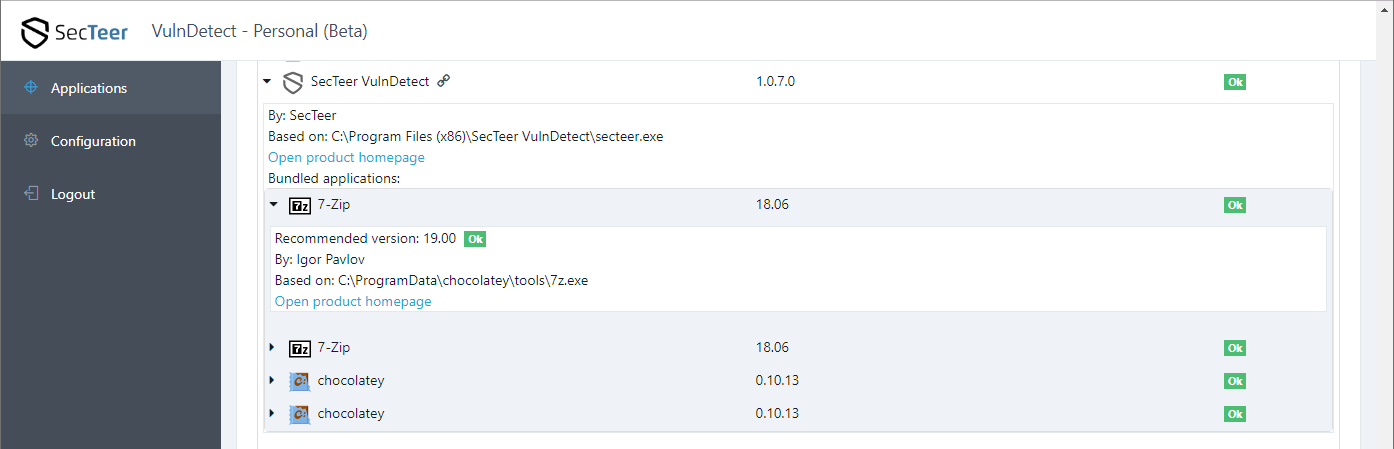
Thank you @Tom for implementing this feature.
-
T Tom referenced this topic on

Hello! It looks like you're interested in this conversation, but you don't have an account yet.
Getting fed up of having to scroll through the same posts each visit? When you register for an account, you'll always come back to exactly where you were before, and choose to be notified of new replies (either via email, or push notification). You'll also be able to save bookmarks and upvote posts to show your appreciation to other community members.
With your input, this post could be even better 💗
Register Login